Lulu
All projects

Case study

Path Learning

UX Design · Product Research · Mobile

A practice-first learning app that turns skill-building into modules — with a path for what to do next, and feedback when you get stuck.

Product Designer · Capstone · 2026 · Solo designer · iOS

Tools·Figma · FigJam · Google Meet

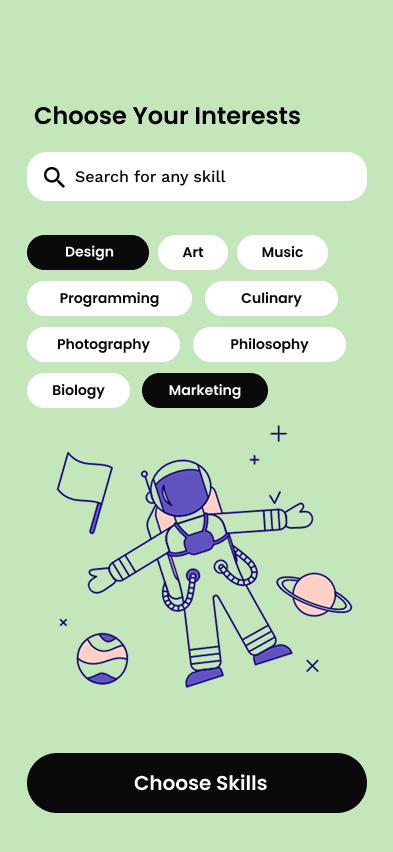
Path Learning onboarding — Choose Your Interests with searchable skill chips
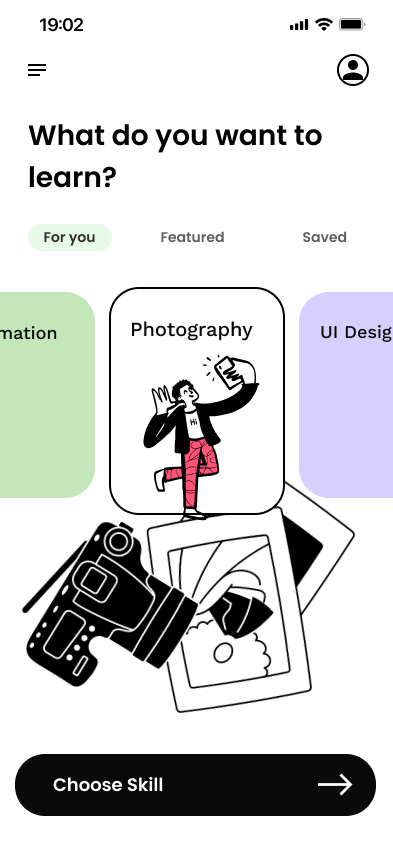
Path Learning home — What do you want to learn, Photography skill selected
Overview

Overview

Path Learning is a project-based mobile app for self-directed learners who are tired of watching without doing. Instead of course catalogs and completion badges, the product is built around illustrated skill paths and modules — a lesson, an assignment that produces an artifact, then AI and mentor feedback. I led research, IA, wireframes, visual design, and two rounds of usability testing as sole designer.

Problem

Learners get stuck in tutorial hell, drowned in content choices, and left without feedback that actually helps them improve.

Passive video consumption creates a false sense of mastery that disappears the moment someone opens a blank project.

Feedback is either generic praise or binary pass/fail — not category-specific enough to change lighting, composition, or logic.

Fragmented catalogs cause choice paralysis, so people spend their limited free time searching instead of practicing.

Goals

Goals

Flip the default EdTech loop from Watch → Read → Quiz to Try → Struggle → Learn → Feedback → Retry, so every concept is immediately practiced and every completed assignment becomes portfolio evidence.

Research

Research

The research question was how self-directed learners move from theory to practice — and where they abandon that jump. I interviewed self-taught creatives, mid-career switchers, and hobbyists, and audited Maven, Exercism, and MentorCruise to map gaps in feedback, structure, and mentorship.

User interviews

Structured sessions on how people currently learn, where projects stall, and what makes feedback feel actionable versus empty.

Competitive analysis

Compared Maven, Exercism, and MentorCruise on practice loops, mentor access, and whether progress felt like portfolio work or video check-offs.

Affinity mapping

Synthesized quotes into three problem clusters — tutorial dependency, feedback quality, and choice overload — which became the product’s north star.

3

problem clusters from affinity mapping

3

competitor platforms audited

5

moderated usability participants

  • “I feel like a pro when I'm following a video tutorial, but the second I close the tab and try to write a single line of code on my own, I realize I haven't actually learned how to think for myself.”
  • “Getting 'looks good!' or vague online comments doesn't tell me what to fix about my lighting or composition to actually get better.”
  • “I spent three hours searching for the 'perfect' intro course. By the time I finally picked one, I was too mentally exhausted to actually start the first lesson.”

Maya Osei

28 · Marketing Coordinator · Atlanta

“I’ve watched a hundred YouTube tutorials and I still can’t build anything from scratch. I need a path — not more content.”

  • Escape tutorial hell and follow one clear, trusted roadmap
  • Build a portfolio that passes real hiring screens
  • Hundreds of hours watched, nothing built
  • Fragmented resources with no sequence or quality signal

Nico Valls

24 · Photographer · Portland

“I have a hundred ideas. I just freeze the second I open a blank file. I need someone — or something — to just get me unstuck.”

  • Ship a finished creative project with an audience
  • Get feedback in a low-pressure space, without judgment
  • Blank-page syndrome — staring at empty files
  • Overly theoretical content that kills creative momentum

Dr. Priya Nair

35 · ML Research Scientist · Cambridge

“I don’t want to just build it. I want to understand why it works — and why every alternative approach doesn’t.”

  • A first-principles understanding of new domains
  • Know the limits and failure modes before adopting a tool
  • Platforms that teach how and skip why
  • Black-box tools with no explanatory depth
Process

Process

Research ran across four weeks — planning, interviews, synthesis, then concept testing. Design work followed the same loop the product teaches: try, get feedback, iterate. Two usability rounds (Phase 1 and Phase 2) validated the lesson-and-assignment model, then tightened pricing, resources, and mentor booking.

  1. Problem framing: tutorial hell, feedback quality, choice overload
  2. IA around sign-up, interests, skill choice, modules, assignment, and mentor booking
  3. Hi-fi prototype and two rounds of remote moderated testing
  • Week 1: Planning and recruitment
  • Week 2: Interviews and competitive analysis
  • Week 3: Synthesis and insights mapping
  • Week 4: Concept testing and prototyping
Architecture

Architecture

The app is organized around a practice loop, not a course catalog. After sign up or login, learners pick interests, choose a skill, follow a module path, then work through Lesson / Assignment / Feedback — with a mentor to book when they want a human eye. Home, Paths, Projects, Mentors, and Settings live in the menu.

  • Splash → Sign up or login
  • Onboarding → Choose your interests, then a skill
  • Home → What do you want to learn? For you / Featured / Saved
  • Path → Photography · Visual Storytelling modules
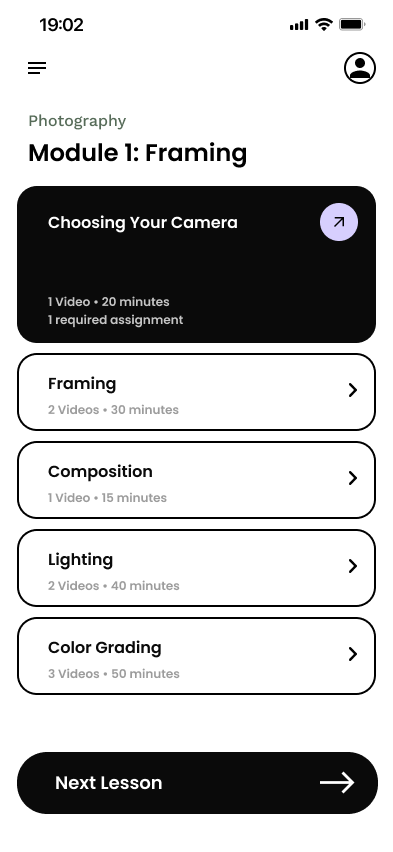
  • Module → Lesson list (e.g. Module 1: Framing)
  • Lesson → Lesson, Assignment, and Feedback tabs
  • Mentors → Profile, availability, live booking
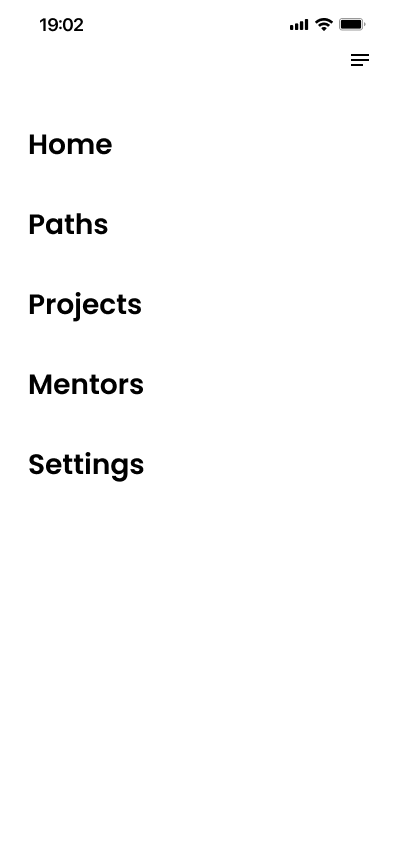
  • Menu → Home, Paths, Projects, Mentors, Settings
Sign up / login
Choose interests
Choose a skill
Start the path
Lesson → Assignment → Feedback
Book a mentor
Wireframes

Wireframes

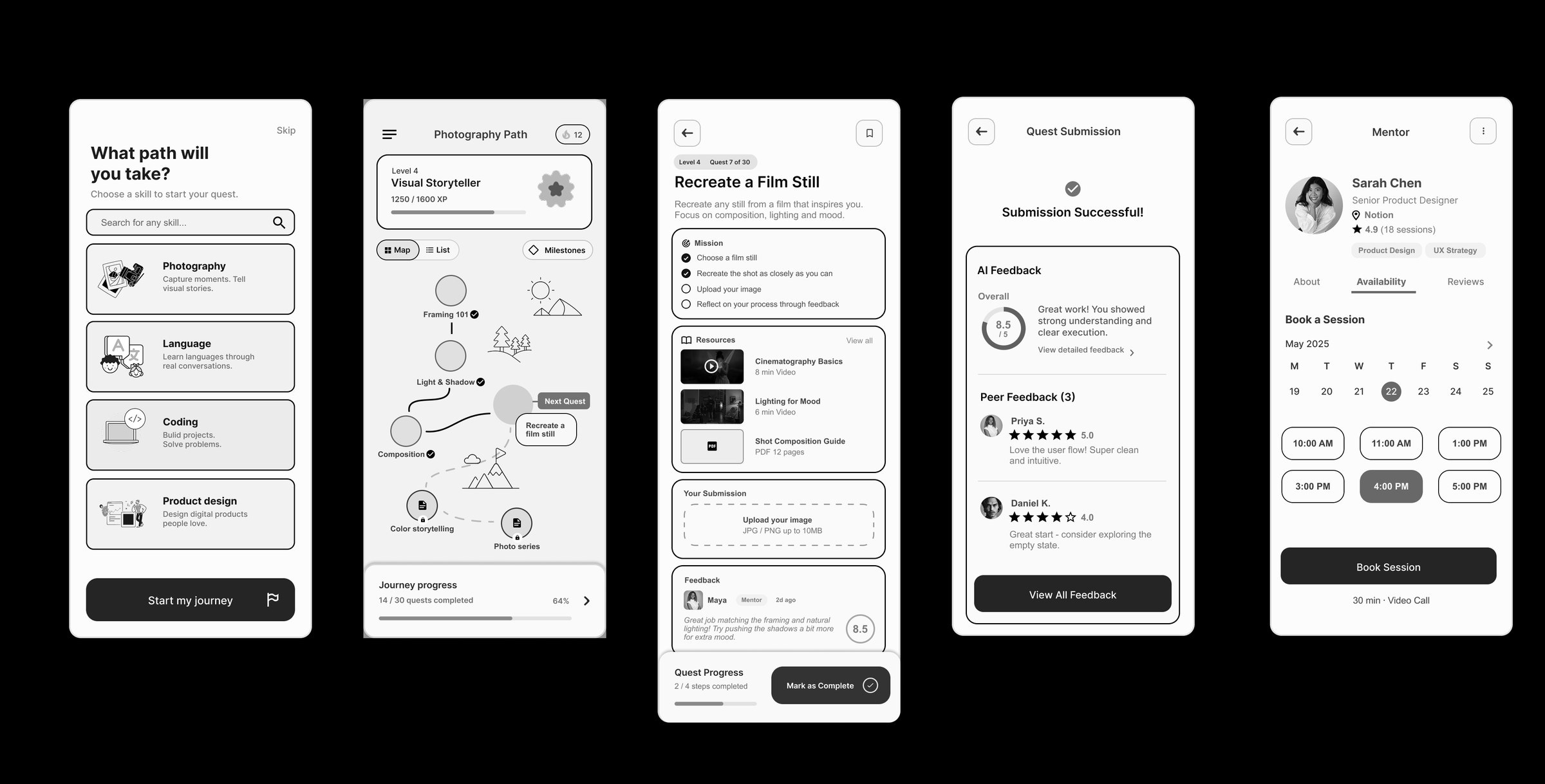
Early screens locked the core loop before visual design: skill choice, a photography path, a lesson with upload, and mentor booking. Testing later confirmed the path-and-assignment format; the friction lived in drafts, academic depth, and pricing transparency.

Path Learning grayscale screens — skill selection, photography path, lesson, submission, and mentor booking
Core loop in grayscale: choose a skill, follow the path, submit work, book a mentor
Onboarding

Onboarding quiz

Onboarding asks what do you want to learn? after Choose Your Interests — searchable skill chips (Design, Photography, Marketing) instead of a course catalogue. Search on the interests screen is how a freeform goal still becomes a path.

Outcome-first phrasing

Participants preferred a direct “What do you want to learn?” over a course catalogue — it felt tailored rather than like shopping.

Snackable over exhaustive

Busy professionals wanted directed, short practice — not another hour-long lecture before they could start.

Pricing up front

Career switchers wanted ROI and plan details early. Phase 2 added a pricing step without hurting completion.

  • “It's so visually clean and directly asks what I want to make. It feels like it's tailoring the journey to me.”
  • “It's simple and concise—not too much wording. Very easy to read and answer.”
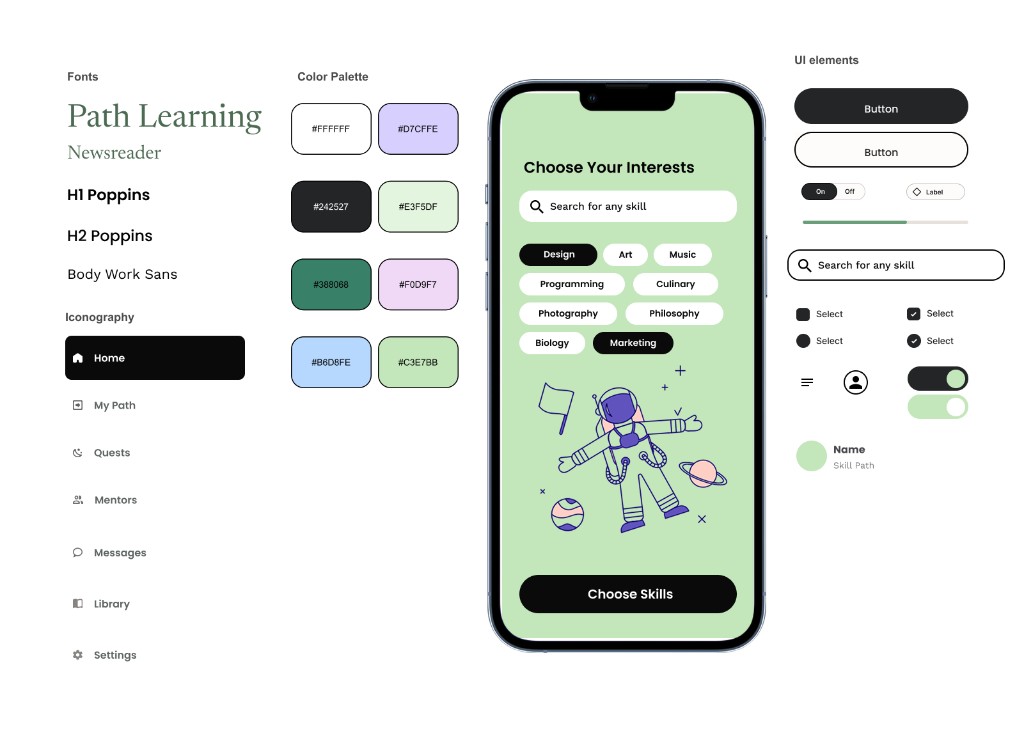
Path Learning brand system — Newsreader wordmark, Poppins headlines, palette, iconography, and UI
Type, palette, iconography, and core UI
Style

Style

The brand needed to feel like a studio for practice — playful illustration, not another gamified course app. A Newsreader wordmark in forest green, mint fields, and charcoal actions keep skill cards and completion states distinct without turning the product into a toy.

Color palette

Mint (#E3F5DF) holds splash and sign-up so illustration can sit on a field instead of a white void. Lilac is login. Charcoal (#242527) is the only high-contrast action. Forest (#388068) is reserved for the wordmark. White is the working surface. Sage, blush, and sky mark adjacent skills without turning the product into a toy.

Paper

#FFFFFF

Buttons, search, working surfaces

Charcoal

#242527

Primary buttons, selected chips, text

Forest

#388068

Wordmark

Mint

#E3F5DF

Splash, interests, path fields

Sage

#C3E7BB

Skill-path chips

Lilac

#D7CFFE

Skill and completion accents

Blush

#F0D9F7

Secondary skill accents

Sky

#B6D8FE

Secondary UI accent

Typography

Newsreader is the Path Learning wordmark. Poppins carries H1 and H2 so “Choose Your Interests” and skill names stay friendly at phone size. Work Sans is the body — search, chips, and long lesson copy — so it doesn’t compete with the display type.

Newsreader

Wordmark

Poppins

H1 and H2 headlines

Work Sans

Body and UI

Voice

The product speaks in short actions, not catalog copy: “Get Started,” “Sign Up,” “Login,” “Choose Skills,” “Choose Skill,” “Next Lesson,” “Complete Lesson.” Feedback is a score plus notes — mentor and AI — instead of a vague “looks good.”
Hi-Fidelity

Hi-fidelity prototypes

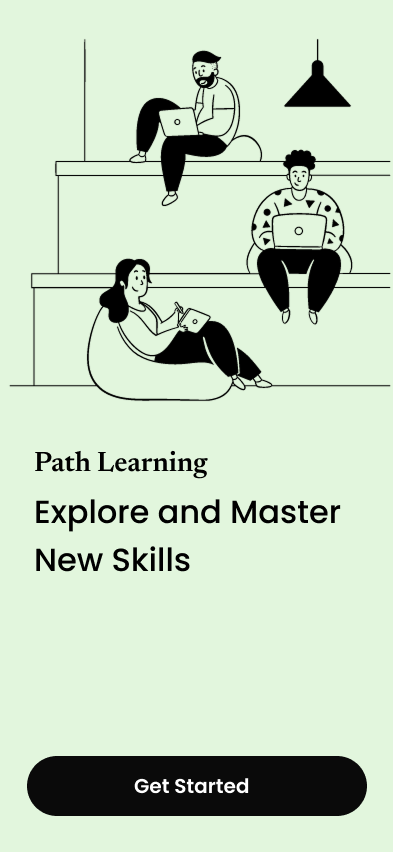
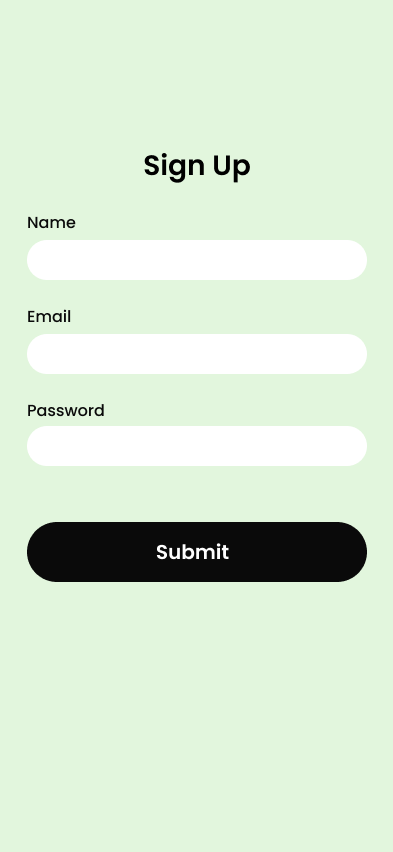
High-fidelity screens sit on mint, lilac, and white, with charcoal actions and line illustration. Splash offers Get Started, then Sign Up and Login; onboarding asks what you want to learn; photography opens as a Visual Storytelling path of modules; each lesson splits into Lesson, Assignment, and Feedback — including mentor and AI scores — then a live booking surface. A menu of Home, Paths, Projects, Mentors, and Settings holds the rest of the app.

Path Learning splash — Explore and Master New Skills, with Get Started
Splash
Path Learning sign up — Name, Email, and Password
Sign up
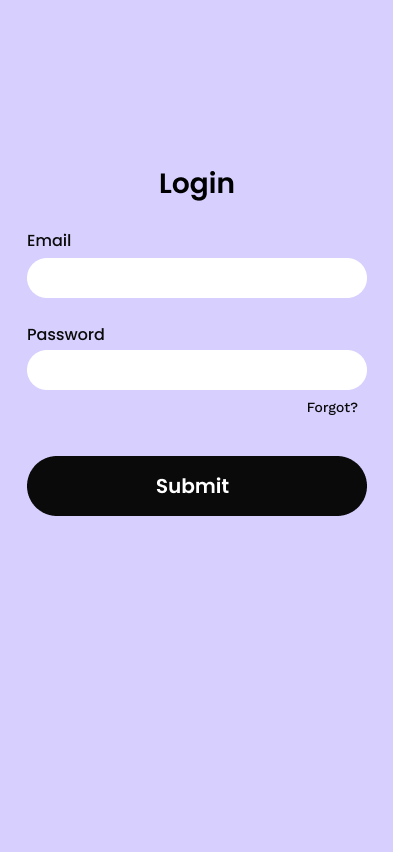
Path Learning login — Email, Password, and Forgot
Login
Path Learning onboarding — Choose Your Interests with searchable skill chips
Interests
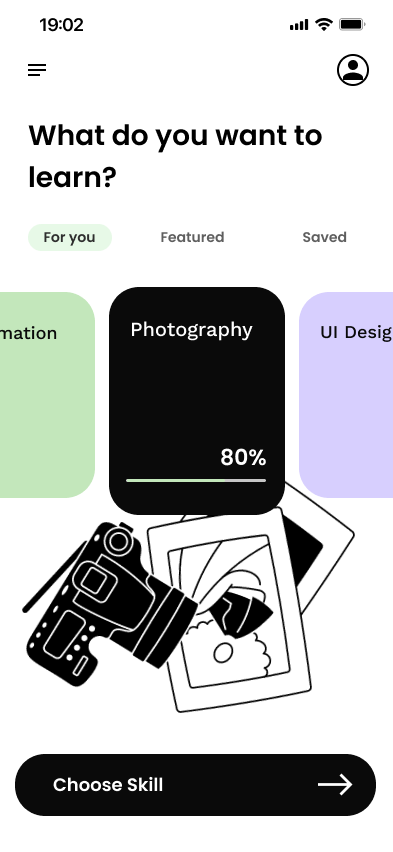
Path Learning home — What do you want to learn, Photography skill selected
Choose a skill
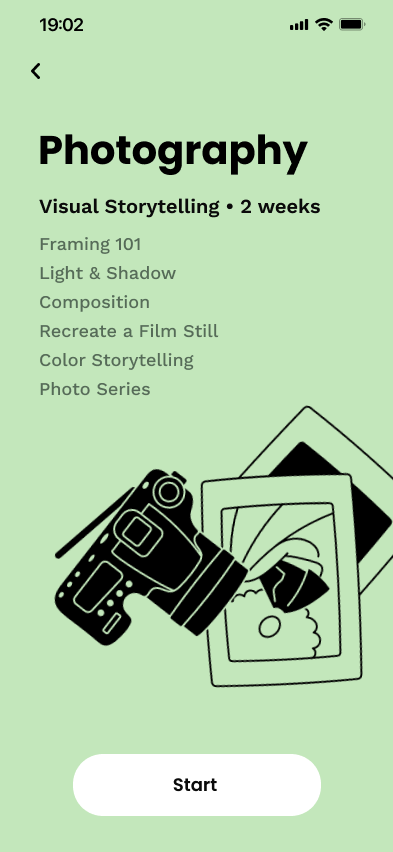
Path Learning photography path — Visual Storytelling modules
Photography path
Path Learning Module 1 Framing with Choosing Your Camera current
Module
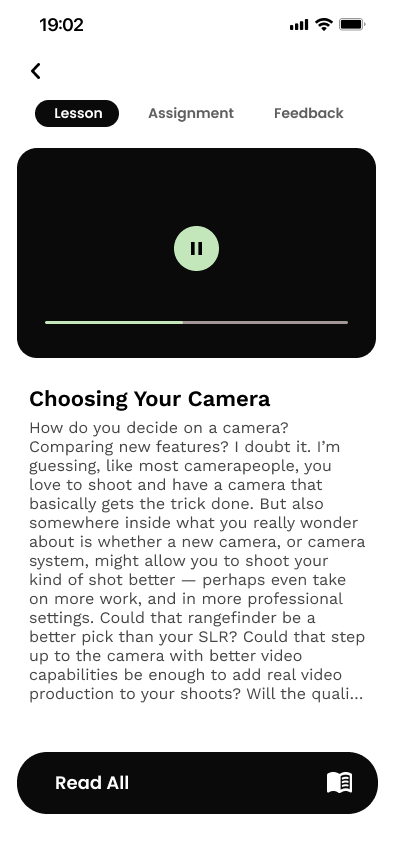
Path Learning lesson — Choosing Your Camera with video
Lesson
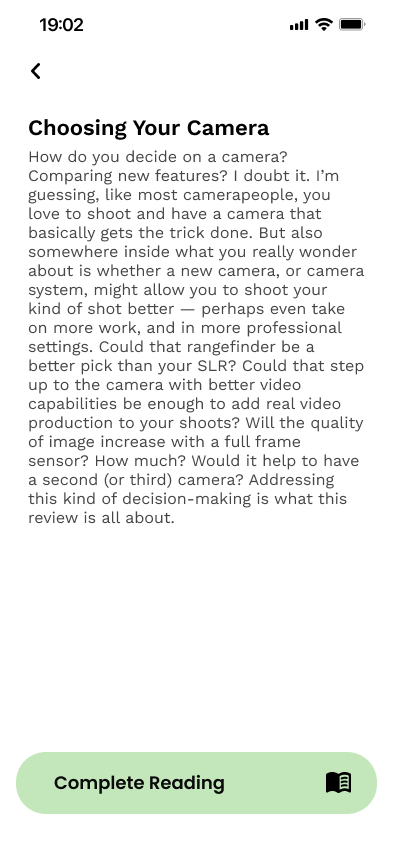
Path Learning lesson reading — Choosing Your Camera full article
Reading
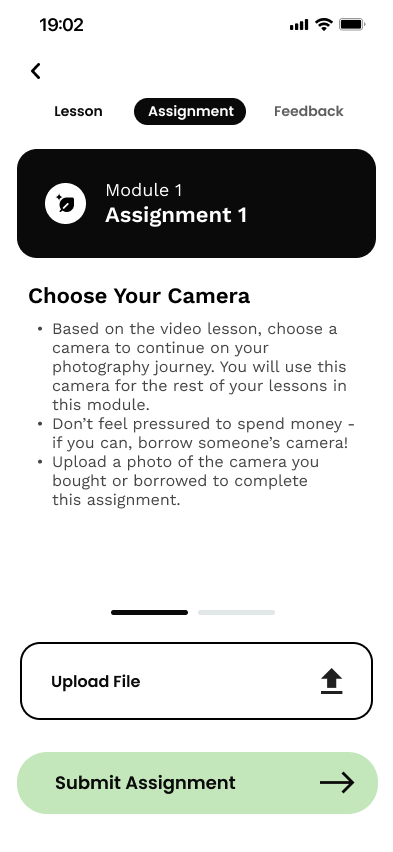
Path Learning assignment — Choose Your Camera with file upload
Assignment
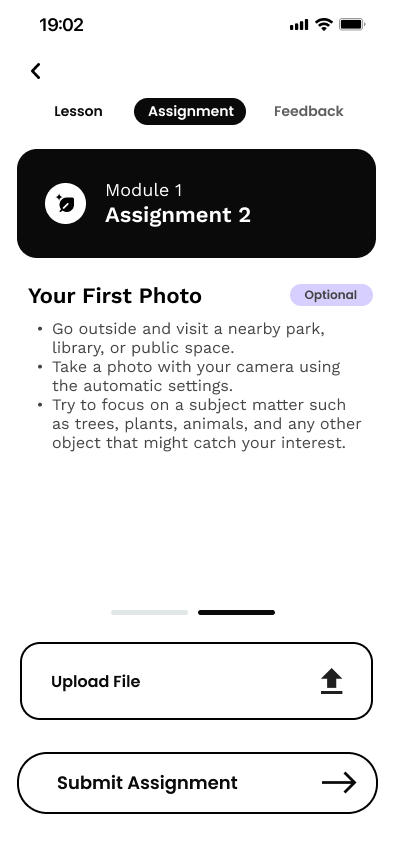
Path Learning assignment — Your First Photo with file upload
Assignment 2
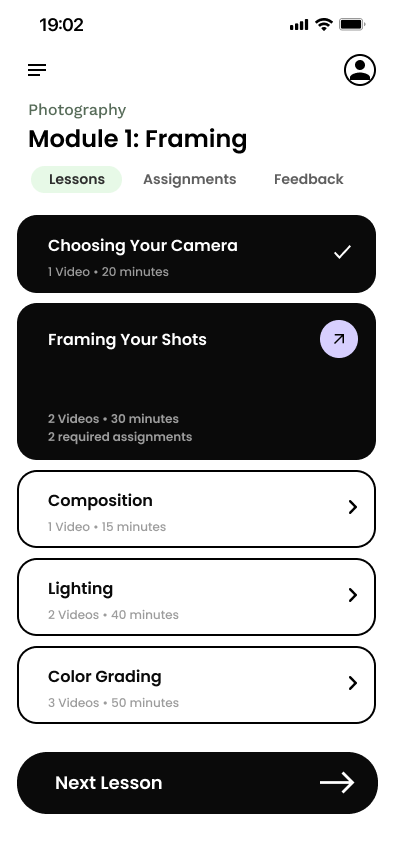
Path Learning Module 1 Framing — first lesson complete, Framing Your Shots current
Module progress
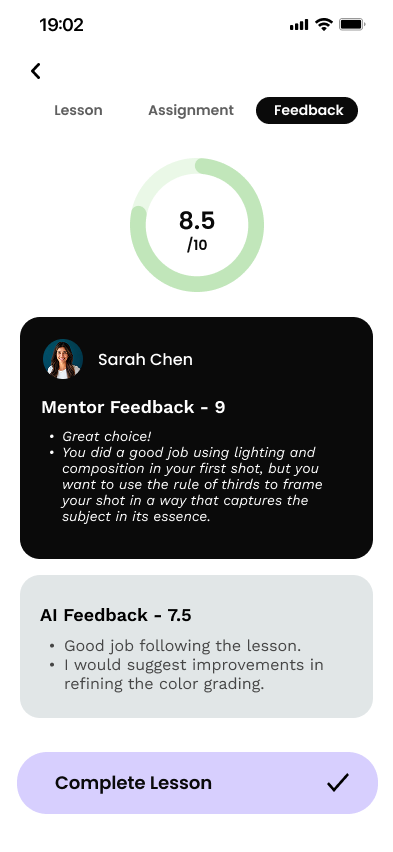
Path Learning feedback — 8.5 overall with mentor and AI notes
Feedback
Path Learning home — Photography skill card at 80 percent
Skill progress
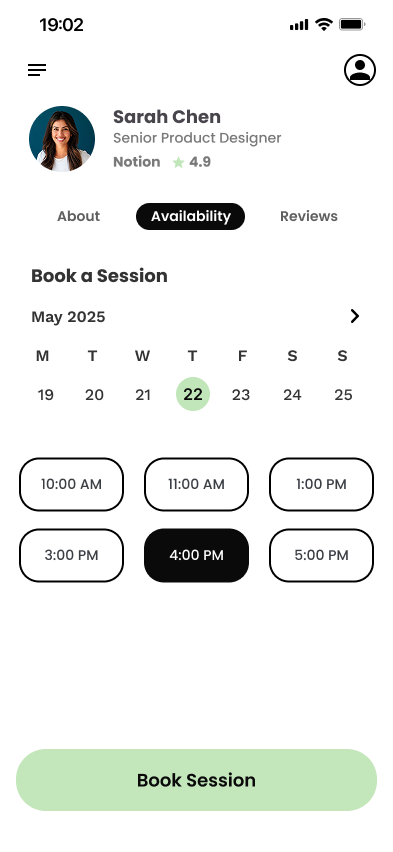
Path Learning mentor booking with Sarah Chen
Mentor
Path Learning menu — Home, Paths, Projects, Mentors, Settings
Menu
Solution

Solution

Path is a practice loop of modules, assignments, and feedback — not a video library with a progress bar. Four surfaces carry the core loop; the mentor calendar sits one step up when automated notes run out.

Lesson + assignment

A short lesson, then an artifact — choose a camera, upload a photo — instead of finishing a video and stopping.

Illustrated skill path

Photography opens as Visual Storytelling: Framing 101 through Recreate a Film Still, so the next module is a list, not a search. The home card later shows percent complete so progress is a project, not a video checkbox.

AI and mentor feedback

An overall score with separate mentor and AI notes — lighting, composition, color — instead of a pass/fail.

Mentor booking

Live availability on Sarah Chen’s calendar when the assignment needs a human eye. Testing made the calendar easy; the remaining request is a lower-cost quick critique.

Test

Testing

Two rounds of remote moderated tests with 5 participants (career switchers, an active maker, a theoretical learner, a structured learner). Phase 1 proved the lesson-and-assignment loop. Phase 2 measured iterations on pricing, module progression, collapsible deep-dives, and mentor booking.

  • 100% completed onboarding in both rounds; difficulty moved from 1.2 to 1.1 / 5 after adding pricing.
  • The photography path and snackable lessons were the strongest engagement drivers — “checking off videos doesn’t feel like real progress.”
  • Mentor booking hit 100% completion; Phase 2 ease improved from 1.8 to 1.1 / 5.
  • AI + structured peer prompts (“what works” / “one change”) reduced isolation; scholars still wanted Socratic depth over a single 8.5 score.
  • Added early pricing transparency for structured learners and career switchers.
  • Collapsible deep-dive literature and Socratic prompts for theoretical learners.
  • Persistent Complete Lesson on the feedback tab; draft/sandbox remains a next-step for submission anxiety.
  • Redesigned Sarah Chen booking calendar; planned a $20 asynchronous quick critique beside live sessions.
Impact

Impact

100%

onboarding completion in both test rounds

1.1

mentor booking difficulty after iteration

5

archetypes tested across two phases

Conclusion

Reflection

The product only works if the first session produces work, not a watched video. The path, the assignment, and the feedback ladder all exist to get someone from a blank page to an artifact they can show. What I’m still holding: a true draft/sandbox, and a cheaper asynchronous mentor option so live calls aren’t the only human door.

  • Serving switchers who want a rigid roadmap, makers who want open paths, and scholars who want depth — without three separate apps.
  • Submission anxiety: people would finish the assignment steps and still hesitate to mark work final.
  • Pricing trust versus onboarding length — adding a plan step helped, but the questionnaire can’t grow forever.
  • Progress has to look like a project milestone, not a video checkbox.
  • Feedback is a ladder: AI for speed, constrained peer prompts for quality, humans for judgment.
  • Collapsible depth lets scholars go further without trapping casual learners in literature.
  • Save-draft / sandbox on assignment upload.
  • Stronger visual affordance on deep-dive toggles.
  • Asynchronous $20 quick critiques next to live booking.

Designing a full practice loop — from path choice through mentor booking — and watching testers describe it as job-ready progress instead of another course to finish.

Next

PulseFit