Lulu
All projects

Case study

Netflix Community

UX Design · Product Research · Mobile · TV

A private-by-default social layer for Netflix — friend circles, spoiler-safe discussion, and trusted collections that keep the story going in-app. View interactive prototype

UX/UI lead · 4 weeks · 2026 · Solo designer · Mobile and TV

Tools·Figma · FigJam
Netflix Community preview
Overview

Overview

Netflix Community is a four-week feature concept that turns Netflix from a utility for watching into a place to sit with a story afterward — without making consumption secondary. As UX/UI lead I owned the end-to-end process: research, IA, wireframes, and a high-fidelity prototype. The work targets platform leakage: people leave for Reddit, YouTube, WhatsApp, and IMDb because the app has nothing to say once the credits roll. Netflix already wins at algorithmic discovery. It is missing an integrated social loop.

Problem

After a title ends, people leave Netflix to talk, search, and decide what to watch next — and the app gives them no trusted place to stay.

Platform leakage. Viewers fragment the experience across Reddit, YouTube recaps, and group chats, so the social loop never comes back.

Public-by-default is the wrong model. Forums feel noisy, spoiler-heavy, and unsafe. People want intimacy — discussion inside private circles, not a bid for viral metrics.

Discovery paralysis. A huge catalog plus untrusted recs makes choosing the next title tiring, so sessions end at the credits.

Goals

Goals

Internalize the post-watch loop: private-by-default circles, spoiler-gated discussion at high-intent moments (including TV → phone), and trusted collections that turn a friend’s note into Play or Add to My List.

Research

Research

I audited where social discovery currently lives, then interviewed people who already talk about shows constantly — just not on Netflix. Competitors solve what to watch, but they all sit outside the viewing moment. Interviews made the product constraint obvious: social features fail when they are public-by-default.

Competitive audit

Mapped Letterboxd, Trakt, IMDb, and Reddit. Each solves discovery or discussion off-platform, so the moment after the credits still leaks out of Netflix.

User interviews

Five semi-structured sessions with power users aged 25–34. The dominant frustrations were spoiler risk and the noise of public forums; the desire was safety and intimacy inside a trusted circle.

Synthesis

The design insight was private-by-default. People do not want to compete for attention. They want to share trusted recs and talk immediately after the credits, with spoilers gated until they choose otherwise.

5

power-user interviews, ages 25–34

4

products in the competitive audit

7

task flows in usability testing

Jordan Hale

31 · Solo viewer · Oakland

“I finish a finale and have no one to talk to. Reddit is a spoiler minefield. I just want a room that waited with me.”

  • Episode-gated discussion that matches progress
  • Plot context without leaving for YouTube
  • Isolation after watching
  • Spoilers and pile-on culture off-platform

Maya Chen

27 · Social watcher · Brooklyn

“I already text my friends ‘you have to watch this.’ I shouldn’t have to leave the app to send the list.”

  • Share a must-watch list with notes attached
  • Talk with her circle, not the internet
  • Recommendations leak into iMessage and Notes
  • Friend recs are hard to act on later
Process

Process

The strategy is private-by-default — Friend Circles as digital living rooms, Trusted Collections so people can be tastemakers for their circle, and a moderated public hub so people without an active circle are not locked out. Intimacy over virality. I prioritized by whether a feature reduced leakage, protected trust, or shortened the path to the next title.

  1. Audit competitors and interview power users
  2. Commit to private-by-default: Circles, spoiler gates, trusted collections
  3. Sketch, wireframe, then test a hi-fi prototype across mobile and TV
  • Week 1: Competitive audit, interviews, private-by-default insight
  • Week 2: Ideation, lo-fi, Community Hub and collection entry points
  • Week 3–4: Hi-fi, remote usability testing, moderation and trigger refinements
Architecture

Architecture

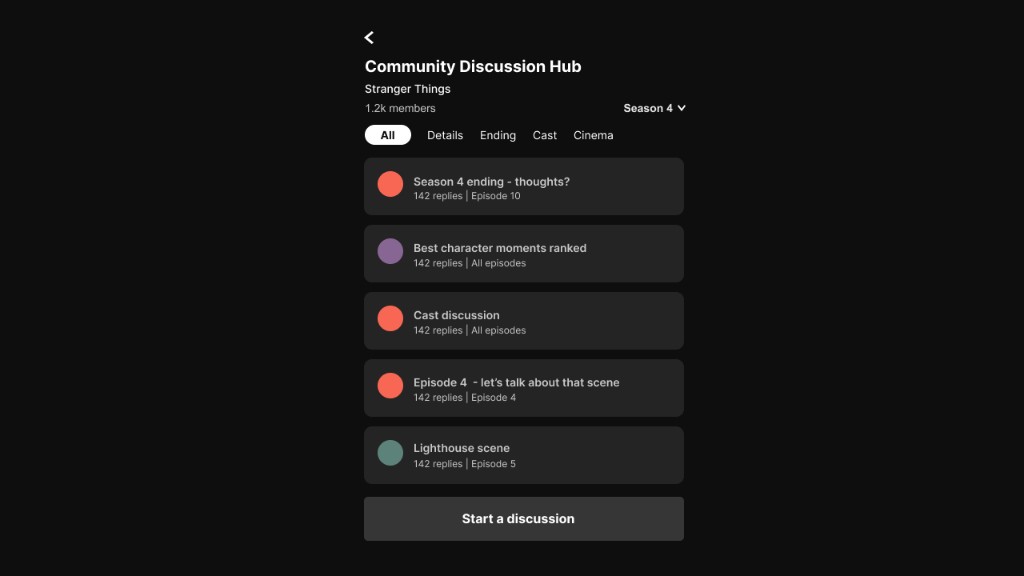
Community lives on the title page as a third tab beside Episodes and Trailers, and as a tab in Netflix navigation. Discussion is grouped by season, episode, and topic, with spoilers blurred until you have reached that episode. Collections sit in the circle, not in a public popularity contest — no follower counts, no trending ranks.

  • Title page → Episodes · Trailers · Community
  • Community hub → Episode-sorted threads, spoiler gates, topic chips
  • Your circle → Private threads, shared collections, notes
  • Collections → Must-watch lists with Add to My List / Play
  • Safety → Report, mute, spoiler gates that stay quiet on the dark UI
Finish a title
Open Community
Join a gated thread
Post in your circle
Save a collection
Wireframes

Wireframes

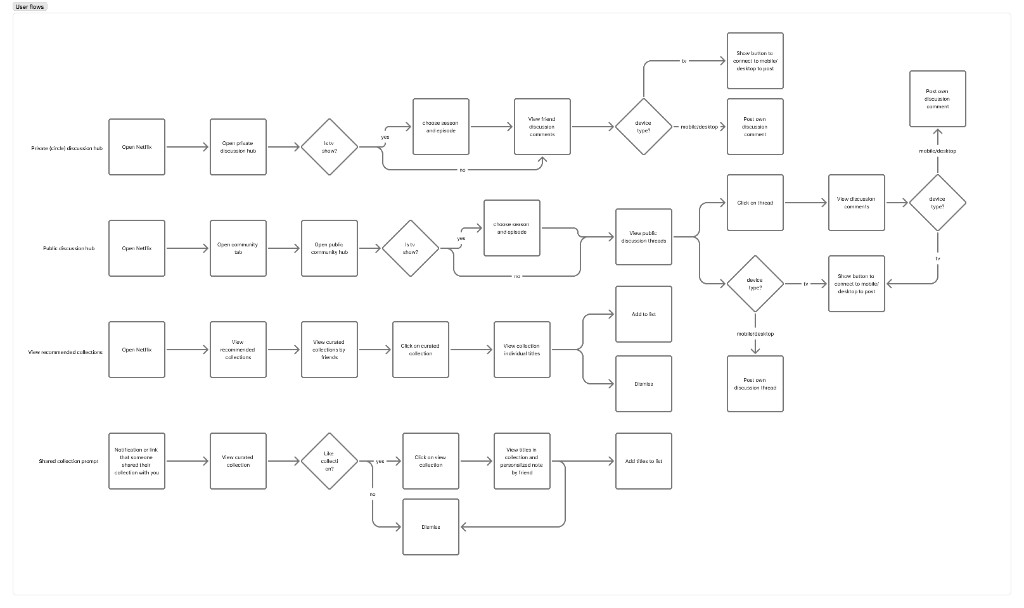
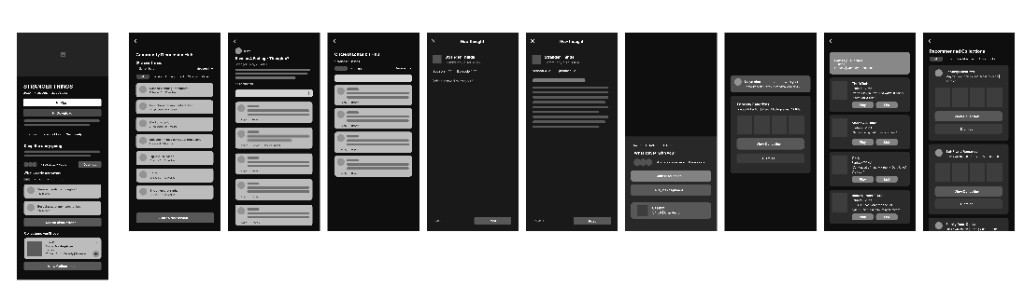
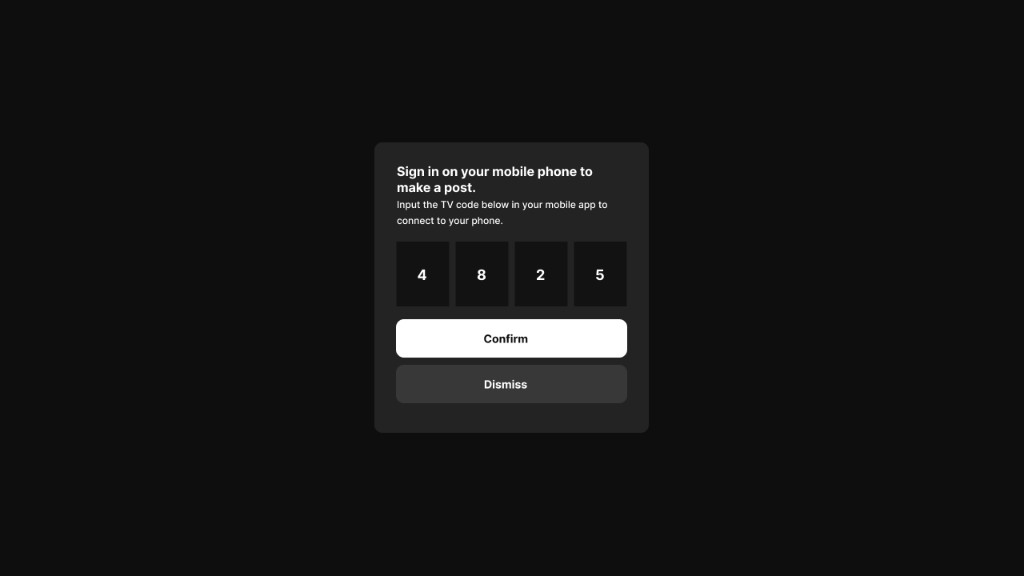
Before visual design I explored structure through rapid sketching and lo-fi — especially the Community Hub layout and Trusted Collections entry points — so information hierarchy could change cheaply. Device splits showed up early: TV is the primary viewing surface, so posting from the living room needed a connect-to-phone path. The remote never becomes a keyboard.

Netflix Community user flows for private hubs, public discussion, collections, and shared-list prompts
Four primary flows: private hub, public hub, collections, and a shared-list prompt
Netflix Community low-fidelity wireframes across title, hub, thread, composer, and collection screens
Low-fidelity screens for title, hubs, threads, posting, and collections
Style

Style

This is a feature inside Netflix, not a new brand. The visual work was about restraint — using the existing dark UI, and adding only the cues that make discussion feel safe: spoiler chips, circle lockups, and collection cards you can act on in one tap.

Color palette

Near-black keeps watching mode intact. Red is reserved for the wordmark and the selected Community tab. Green is only for safety and match — never for likes or ranks — so the product does not start scoring people.

Netflix Black

#141414

App background

Surface

#1F1F1F

Cards and composer

Netflix Red

#E50914

Brand, selected tab

Match Green

#46D369

Safety and match states

Muted

#A7A7A7

Secondary labels

Typography

Title treatment stays Netflix-large. Community copy is smaller and denser — thoughts, not trailers. The spark mark (✦) is the only new identity cue, used on the Community tab so it can sit next to Home and New & Hot without looking like a social network.

Netflix Sans / Arial

UI, titles, and discussion

Voice

“Keep the story going.” “What stayed with you?” “Be kind. Be curious. No spoilers.” The product speaks like a living room, not a feed.

Hi-Fidelity

Hi-fidelity prototypes

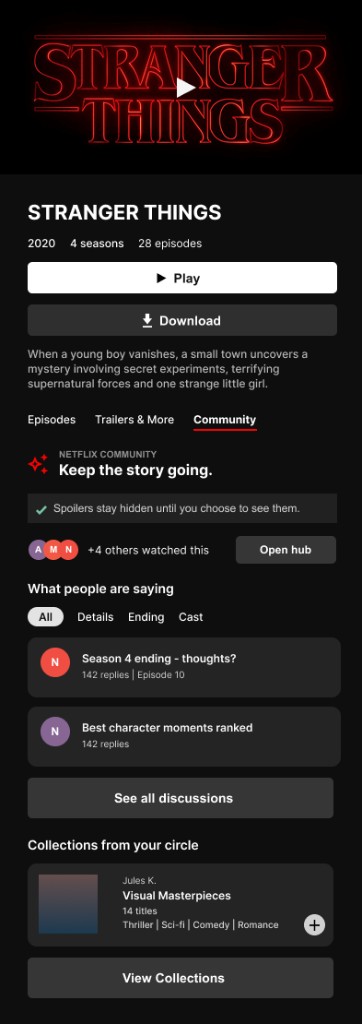
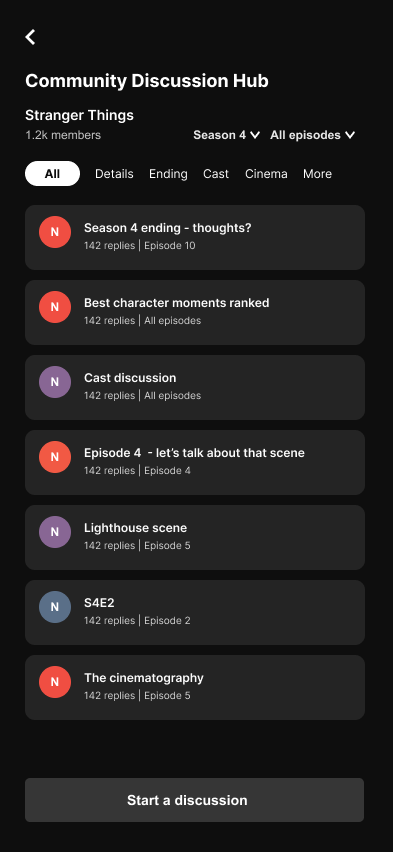
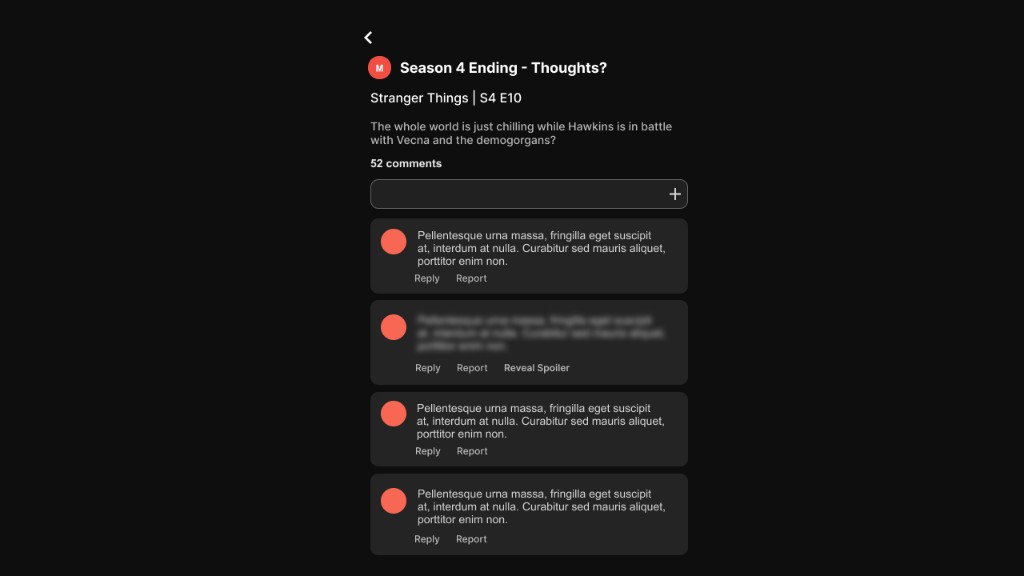
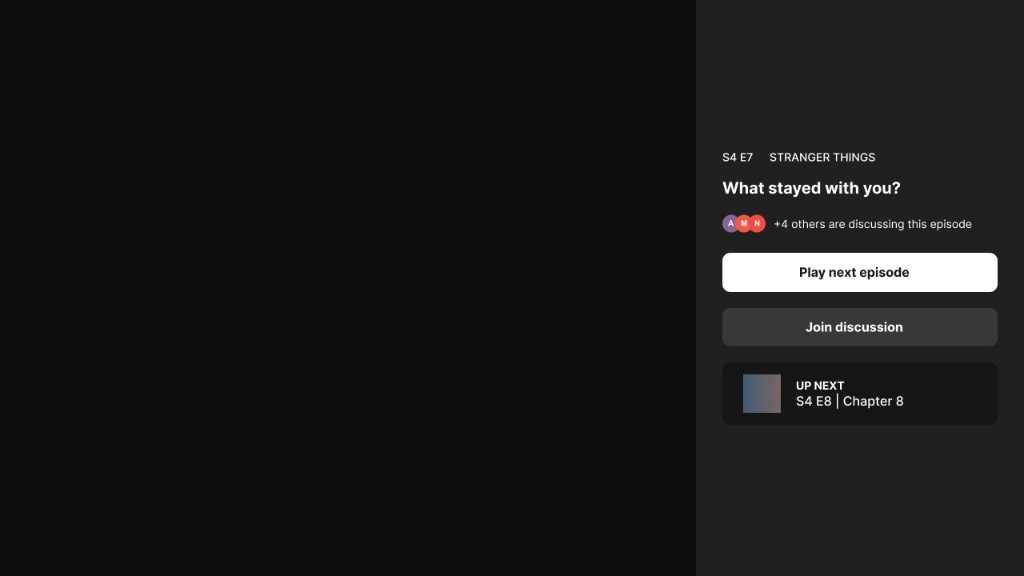
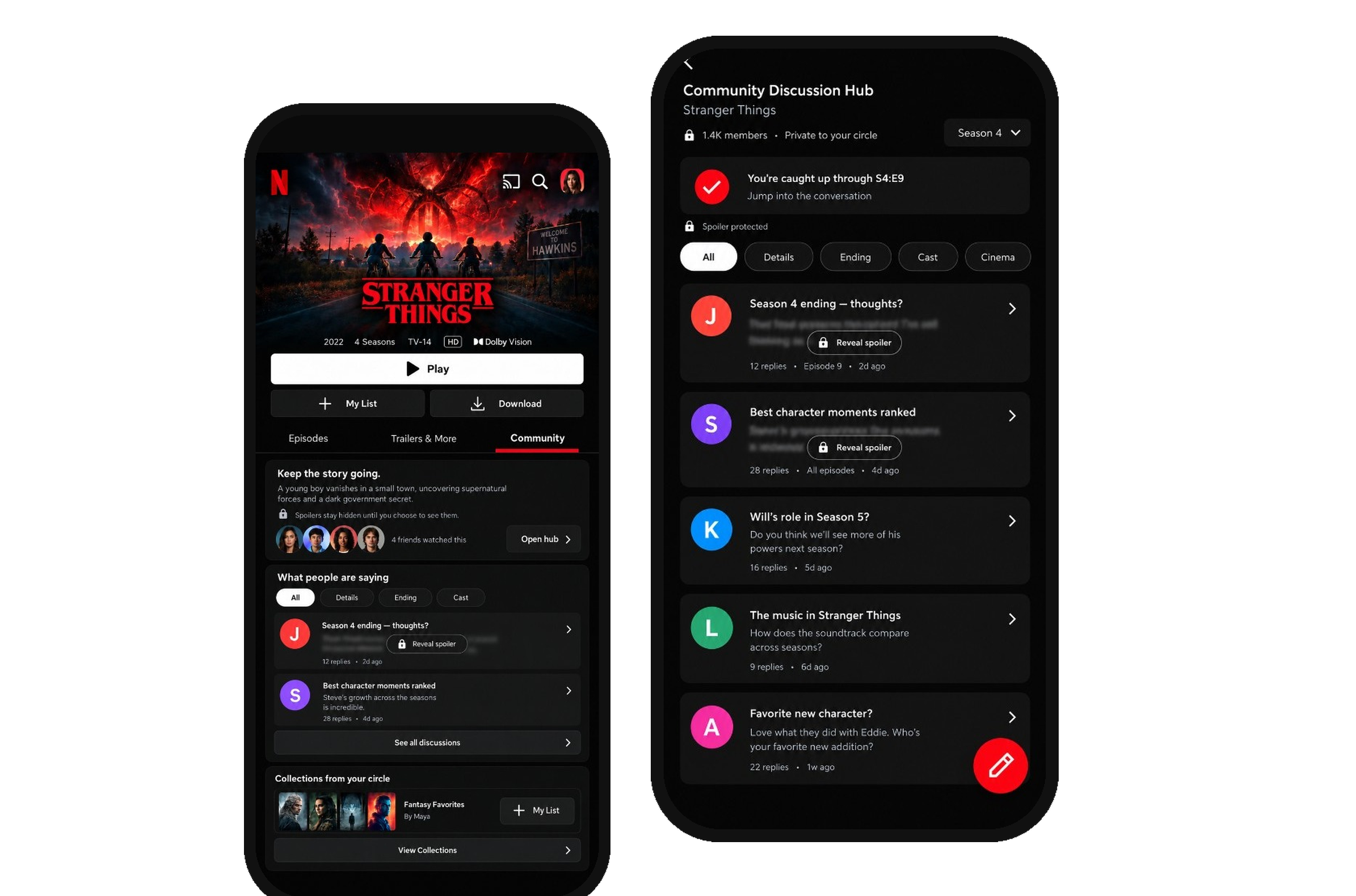
High-fidelity stays inside Netflix’s own system — near-black surfaces, the red wordmark, and a Community tab on the title. Phone and TV share the same jobs with different input. A TV post-watch prompt uses the remote to hand off to the phone, so comments stay frictionless. Copy is quiet on purpose: Keep the story going. Spoilers stay hidden until you choose to see them. A post-watch prompt (What stayed with you?) starts the thread without turning the credits into a comments section.

Phone

Netflix title page with a Community tab on Stranger Things
Title · Community
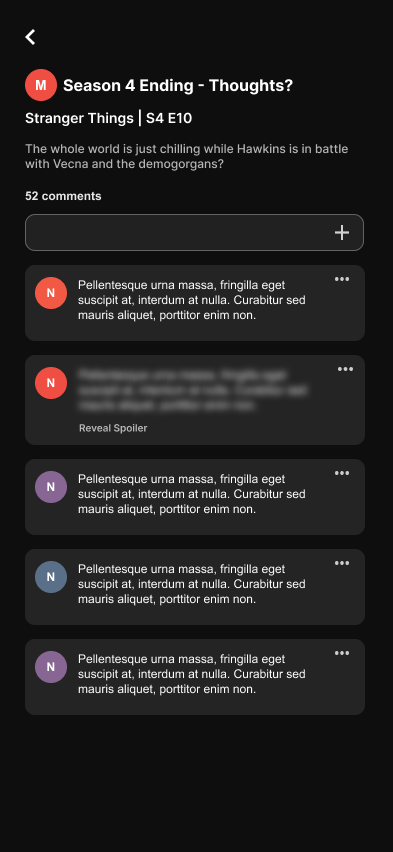
Public Community Discussion Hub for Stranger Things with spoiler-gated threads
Discussion hub
Episode thread with replies and a spoiler-hidden comment
Thread
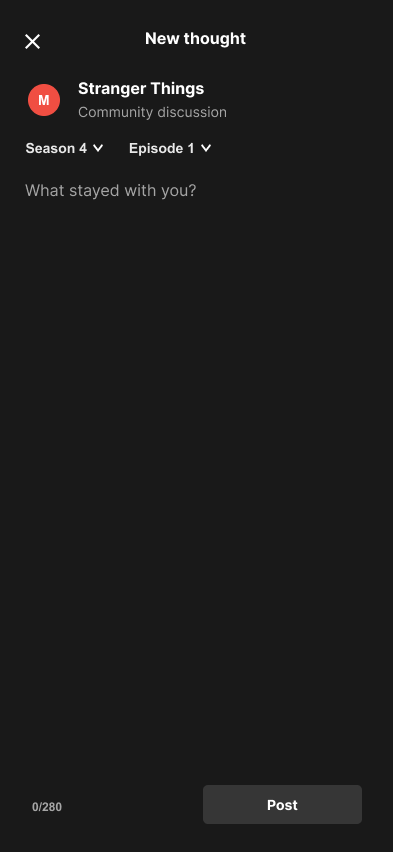
New thought composer with season and episode pickers
New thought
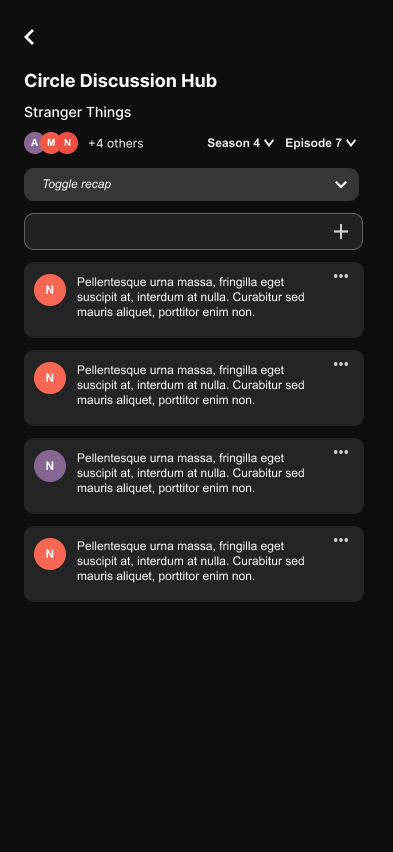
Private circle discussion hub for Stranger Things
Circle hub
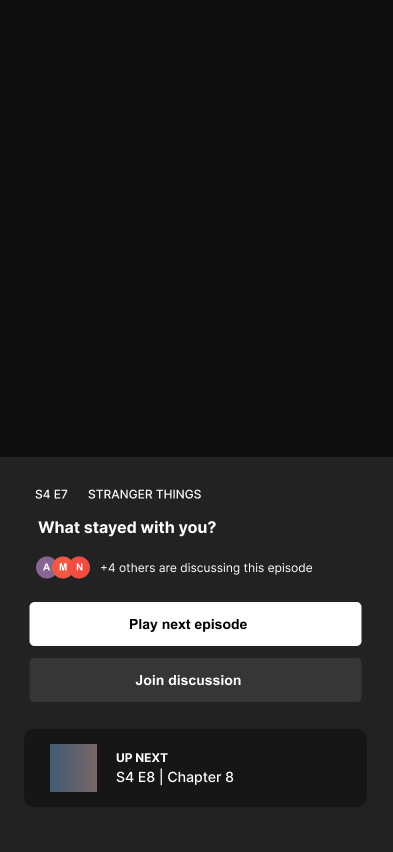
Post-watch prompt asking what stayed with you after an episode
Post-watch prompt
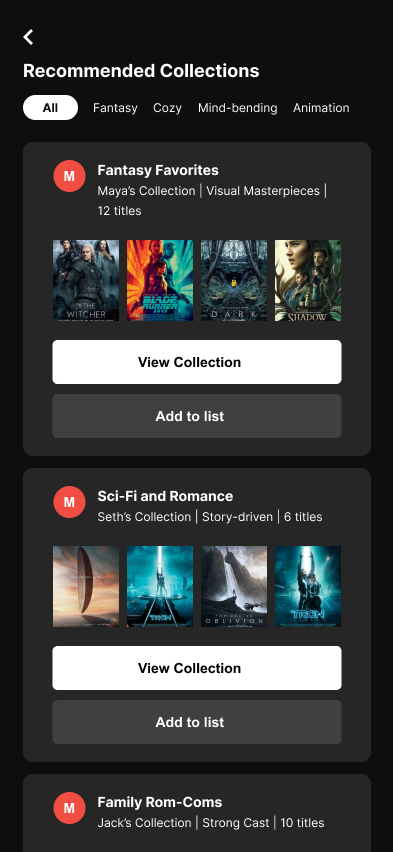
Recommended collections from a circle, filterable by mood
Recommended collections
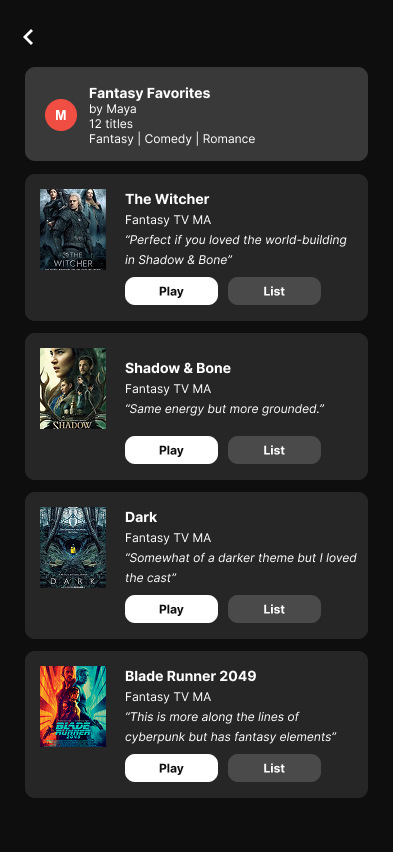
Fantasy Favorites collection with Play and My List actions
Collection
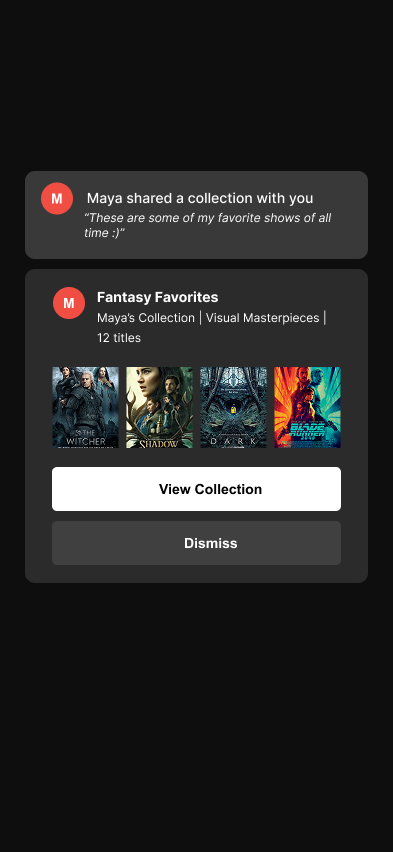
Maya shared a collection with a personal note
Shared collection

TV

TV Community Discussion Hub for Stranger Things
Discussion hub
TV episode thread with replies, report, and spoiler reveal
Thread
TV post-watch overlay asking what stayed with you
Post-watch prompt
TV sign-in overlay with a code to post from a phone
Post from your phone
Solution

Solution

The product balances session length — capturing the high-intent moment after a title — with user psychology: a safe harbor, not a feed. MVP is private-by-default. Virality stays out.

Friend Circles

Private threads with people you already watch with. Trust is the default. Public discussion exists beside it so people without a circle are not locked out — but it is never the first posture.

Trusted collections

Must-watch lists so friends can be tastemakers for their circle. Testers called this a direct answer to choice paralysis: a rec from someone they trust, saved or played in one tap.

Post-watch prompt

A context-aware composer after a title — “What stayed with you?” — designed first for TV, then handed to the phone so the remote never becomes a keyboard. The alternative to idle googling for a recap.

Context cards

Episode and movie recaps at the moment people usually switch to YouTube. Testers wanted them badly — and needed precise triggers so a recap never spoils an episode they have not reached.

Test

Testing

I ran remote usability sessions on the high-fidelity prototype across seven core task flows — posting a thought, private-circle posting, receiving a shared collection, and the rest of the loop. Completion was complete; the work was in how people felt while doing it.

  • 100% task completion, with 1.2 navigation errors per session on average.
  • Context cards ended app-switching for one participant: the recap they usually hunt on YouTube was already in Netflix.
  • Spoiler gates were a prerequisite, not a nice-to-have. People relaxed when unread episodes stayed blurred.
  • 4.8 / 5 trust and safety perception — testers felt safer here than on public social platforms.
  • Tightened when a context card appears so plot summaries cannot fire accidentally.
  • Kept Report and Spoiler controls present but quiet after early notes that the icons felt like policing on the dark UI.
  • Made spoiler gates more visible in the hub — navigation only felt safe once people could see what was hidden.
Impact

Impact

100%

task completion in usability testing

4.8/5

trust and safety perception

4 wks

research through a tested prototype

Conclusion

Reflection

The constraint that mattered most was not building a social network. Netflix already has attention. What it is missing is a trusted room after the story. Users were skeptical of anything that felt broadcastable, and eager once they understood private-by-default. Spoilers, circle privacy, and one-tap collections were the product. Virality was the thing to keep out.

  • Making discussion safe on a TV, where typing and spoiler risk are both worse.
  • Giving recaps at the exact moment of friction without accidental spoilers.
  • Keeping moderation visible without making people feel policed.
  • Trust is the currency. Private-by-default changed whether people would even try the feature.
  • Immediacy matters. Context cards and post-watch prompts work because they sit at the friction — not in a buried tab.
  • Refinement over novelty. The job was to tailor sharing a list or talking about a twist to the emotional context of watching — not to invent a new social network.
  • Category and mood filters for the public hub.
  • Optional sync alerts when a circle shares a list — quiet, not a notification firehose.
  • A broader pass on spoiler-trigger timing across more title types.

Designing a social layer that still feels like Netflix — a living room after the credits, not a feed competing with the story.

Next

Yuugen